

















Registration
HoliganBet registration – account, email and SMS protection


Key facts
HoliganBet registration has three steps; I completed it by confirming my email, and SMS was optional when creating the account. The form collects account, personal and contact details. I enabled SMS protection separately after registration. A significant weakness is that the operator does not provide complete general terms at registration. Process rating: 5,9/10.



HoliganBet registration: three form steps
HoliganBet registration has three screens: account details, personal details and contacts. “Sonraki” moves forward on the first two screens; “Şimdi Kayıt Olun!” submits registration on the third.
Before starting, make sure you can access your email and phone. Completing the form in sequence is easier than returning to fields after discovering a contact is unavailable. Registration requires your own details. Check the email address before continuing: confirmation goes to the channel you entered, and an incorrect address makes completion difficult. Keep control of these contacts after creating the profile too.
Step 1. Enter account details
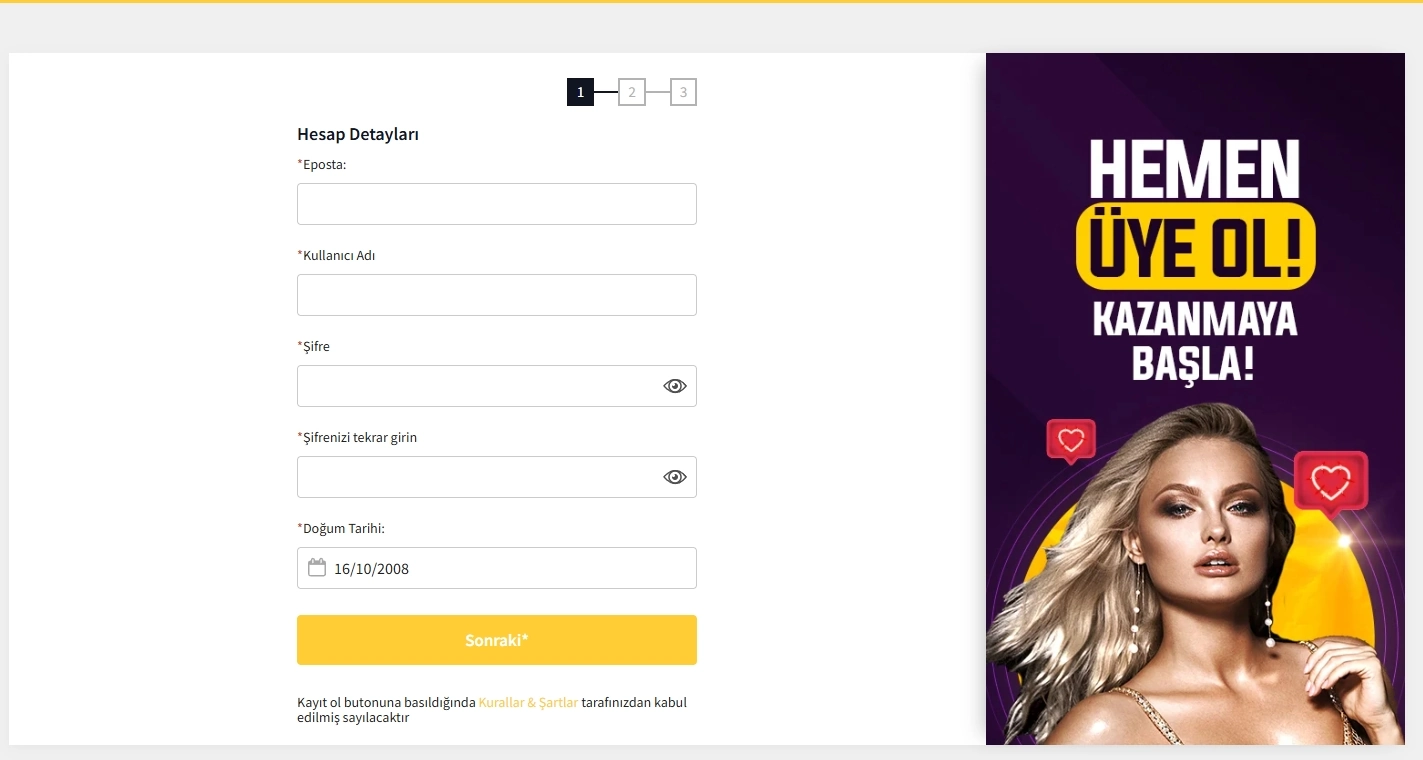
On “Hesap Detayları”, enter your email, username, password, password confirmation and date of birth.
An asterisk marks required fields. Repeat the password in “Şifrenizi tekrar girin” and compare both values before proceeding. Enter your date of birth in “Doğum Tarihi”. Choose a personal password you do not use for email or other sites. If using a password manager, save it under a clear name with the chosen account identifier.
The username is useful for subsequent login; the login form also accepts email. Distinguish these fields when creating the profile: “Eposta” is for the email address, “Kullanıcı Adı” for the username, and the two password fields let you enter and repeat the same password.
Step 2. Complete personal details
“Kullanıcı Detayları” contains first name, surname, street and house or apartment number, city and country. Choose your own country rather than the value shown in an interface example.
I confirmed that users in Armenia, Azerbaijan, Turkmenistan, Tajikistan, Georgia, Uzbekistan, Turkey and Russia can create accounts. Enter your own country; Turkey and +90 belong to the Turkish form display.
The licence terms prohibit participation from Australia, Comoros, France, the Netherlands, Spain, the United Kingdom and the USA; restrictions also cover FATF-blacklisted territories, sanctioned jurisdictions and other territories excluded by the Anjouan regulator. Consider current restrictions and applicable local rules when choosing your country.
At this stage, check your personal details: first name, surname, address and selected country.
Step 3. Enter contacts and finish
“İletişim Bilgileri” contains a phone number, security question and answer, marketing email consent and the SMS registration option. The form asks for a correct number and describes SMS confirmation. The option is selected in “SMS ile üye olmak istiyorum”. The next section explains how this differs from email confirmation and subsequent account protection.
Marketing emails require a separate choice. Read the consent statement and indicate whether you want to receive them. If necessary, change this choice later in your account details — the form states that this is possible.
Pressing “Şimdi Kayıt Olun!” completes the form and is linked to accepting rules whose transparency is discussed below.
| Stage | Purpose | Fields and choices | What to do |
|---|---|---|---|
| 1 — «Hesap Detayları» | Login details | Email, username, password, confirmation, date of birth | Complete the fields and press “Sonraki”. |
| 2 — «Kullanıcı Detayları» | Personal details | First name, surname, address, city, country | Enter your own details and continue. |
| 3 — «İletişim Bilgileri» | Contacts and confirmation | Phone, security question and answer, marketing emails, SMS option | Check your choices and press “Şimdi Kayıt Olun!”. |
Account confirmation and documents
I completed registration by email. I also tested the SMS option: it worked. Choosing it is optional. The phone field is part of the form, while a separate checkbox controls SMS confirmation when creating the profile.
In my initial registration, I completed the form and created the account without a document request. This result applies to the tested scenario; follow the requirements of the relevant verification process for subsequent actions.
| Mechanism | When | Role in the completed process | Practical conclusion |
|---|---|---|---|
| Email confirmation | Account creation | Sufficient to complete registration | Keep access to the specified mailbox. |
| SMS registration | Choice at the contact step | Works but is optional | Choose it deliberately; the email route remains available. |
| SMS protection | Setting up an existing account | Activated separately by me | Do not confuse it with the SMS registration choice. |
| Documents | Tested registration scenario | Not requested | Documents were not needed to complete this initial scenario. |
How to enable SMS protection after registration
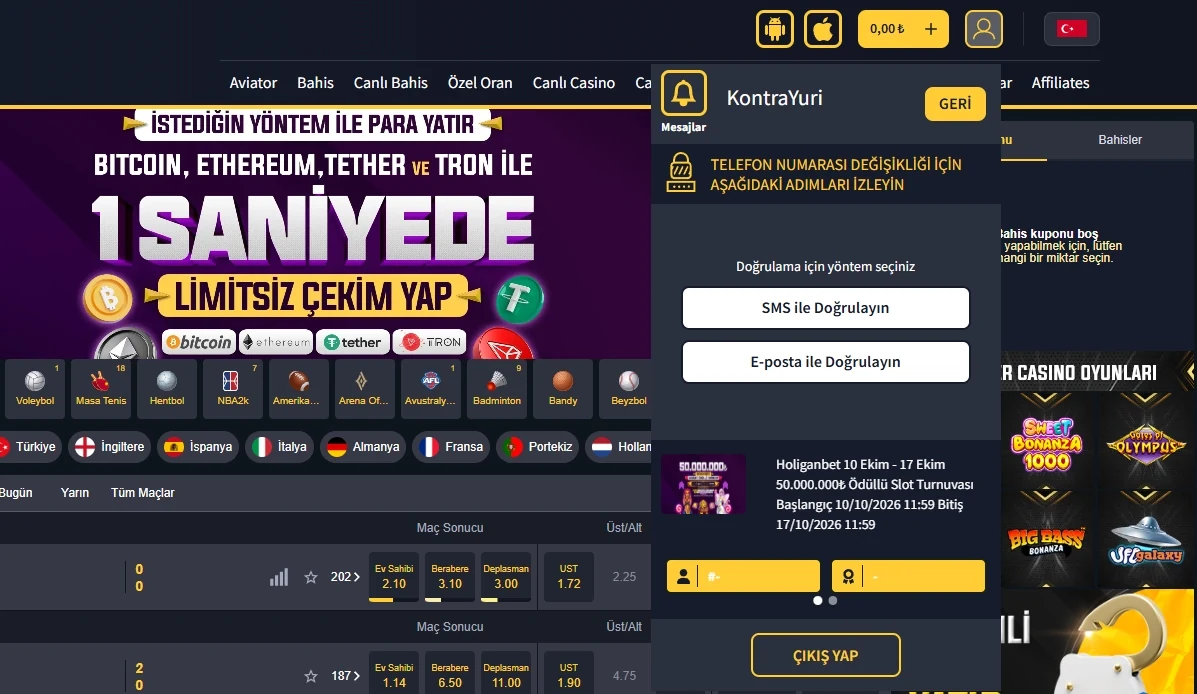
Enable SMS protection in “Hesap Güvenliği” after creating the account. I activated it successfully, independently of choosing email for registration. This setting protects an existing profile and follows one sequence in the account:
-
Log in to the account you created.
-
Open security settings and check the masked phone number.
-
Request the code using “SMS KODU GÖNDER”.
-
Enter the received code in the six positions.
-
Finish setup by pressing “AKTİVE ET”.
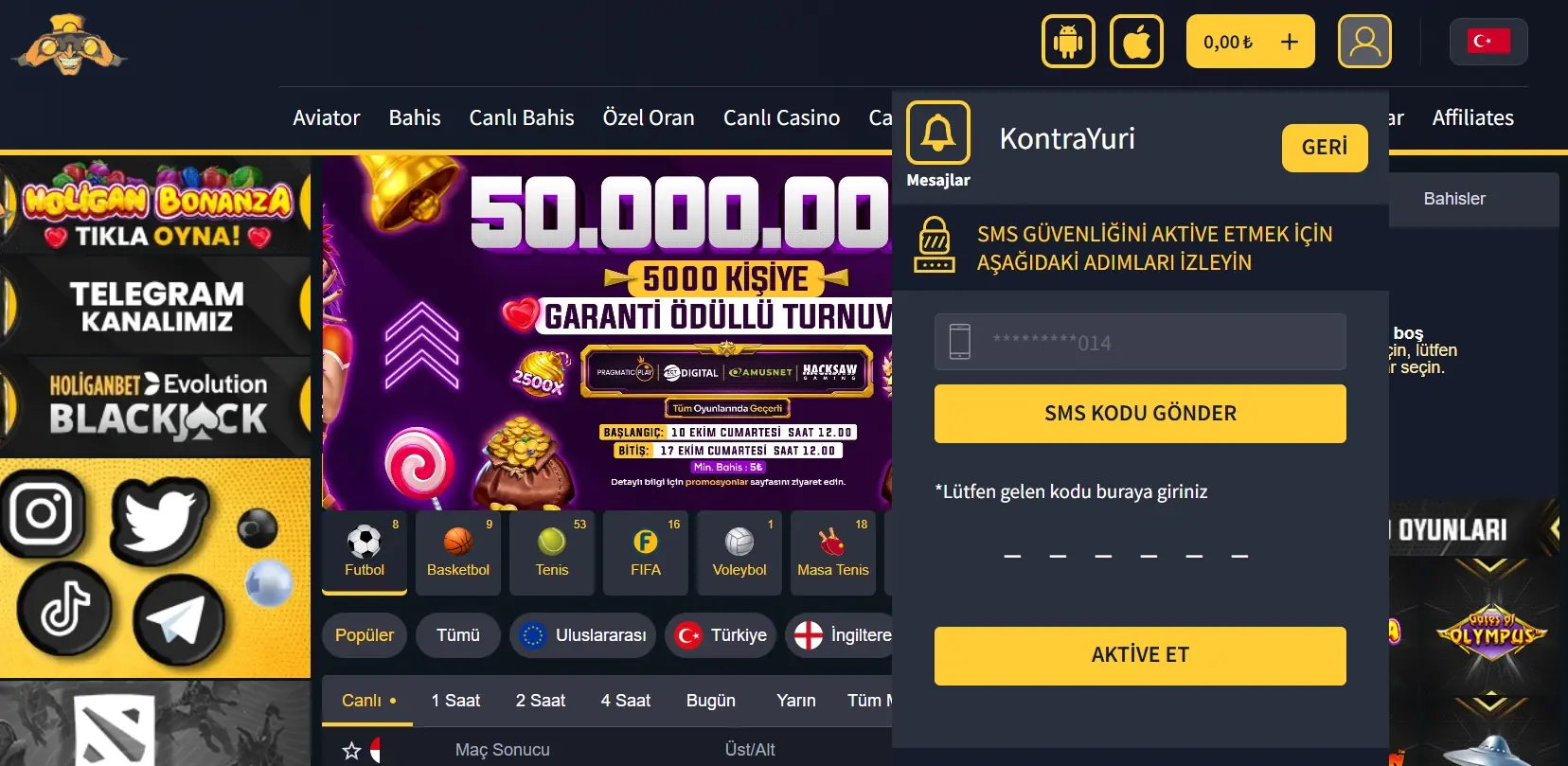
If the number is unavailable, stop before requesting a code. Check how to update the contact in the account or through support. Use “GERİ” to go back. Describe the problem without secret values: the SMS code belongs in the security field.

Android and iPhone
HoliganBet on your phone
Find out how to open the site on iPhone or install the Android app.
Terms and consent before form submission
I checked the “Kurallar & Şartlar” consent: the form contains a link, but the operator did not provide complete general terms at registration.
A link does not resolve the absence of the full text: before consenting, the user cannot read the complete set of general rules.
Before submitting details, read the consent statement and open the terms link. Ask the operator about any material point requiring clarification before using the account. It is particularly useful to understand what you accept by pressing the final button. Missing complete rules reduce transparency even when the profile is successfully created. Form convenience and complete terms concern different aspects of registration.
Email confirmation and marketing email permission serve different purposes. The former concerns profile creation; the latter expresses your advertising preference. Check the marketing setting before submitting the form and change it later in the account if necessary.
After account creation
After login, the account shows three balance types — main, bonus and total. The menu provides messages, security, deposit and withdrawal actions, bonuses, gaming histories, account overview and logout. Start by checking contact details and security settings. “Çıkış Yap” ends the session, while “Hesap Güvenliği” concerns protection settings.
If planning a deposit, open the deposit terms, where amounts and methods are considered by transaction. Check the selected payment method and promotion terms before the relevant action.
For access questions, use the login guide; for protection and legal context, see the safety page.
HoliganBet registration rating
Registration scores 5,9/10. Email confirmation is sufficient, SMS is optional, and protection can be enabled later. The main weakness is that complete general terms are not provided at the consent stage.
| Criterion | Weight in the rating | Score |
|---|---|---|
| Registration completion and ease of use | 29,41% | 7,5/10 |
| Clarity of requested details | 17,65% | 6,0/10 |
| Transparency of checks and terms | 23,53% | 4,0/10 |
| Account recovery and protection | 17,65% | 6,0/10 |
| Consistency of mobile and desktop processes | 11,76% | 5,5/10 |
| Overall | 100,00% | 5,9/10 |
The criteria and calculation rules are explained in the rating methodology. Fields are divided across three stages, but the form includes address details and a security question, while opaque terms noticeably lower the result.

Deposits and withdrawals
Choose a convenient payment method
Compare methods, limits and fees before your first deposit.
Frequently asked questions
Is SMS required for HoliganBet registration?
No. Email confirmation was sufficient in my completed process. The SMS registration option worked but remained optional.
How many steps does the form have?
Three: account details, personal details and contacts. The last screen contains the phone number, security question, marketing preference and SMS option.
Are documents requested when creating an account?
No documents were requested during my registration. This is the result of a particular account creation scenario rather than a rule for every possible subsequent check.
Can SMS protection be enabled later?
Yes. After registration, open account security, request an SMS code, enter the six positions and confirm activation. I successfully completed this sequence.
What about the general registration terms?
The form contains a link and consent, but the operator does not provide complete general terms at registration. Consider this weakness before submitting details.
Conclusion
I created an account through three steps, confirming email without mandatory SMS. The requested fields are shown by stage, documents were unnecessary in the tested scenario, and SMS protection activated successfully after registration. The main weakness remains: complete general terms are unavailable at the point of consent. The overall rating is therefore 5,9/10. If you already have an account, go to login; if planning a transaction, first read about deposits.

Next step
Ready to go to HoliganBet?
Open the platform to log in or register.

About the author
| Field | Details |
|---|---|
| Author | Nick Lemin |
| Role | iGaming analytical expert |
| Experience | 9+ years analysing online casinos, payments, mobile apps and sports betting |
| Published | 14 October 2026 |
| Device | HONOR X9d; iPhone 14 |
| Methodology | Rating methodology |